
From Geometry to Graphing: The Ultimate Visual Math Assistant
Struggling with visual math problems like geometry proofs or complex graphs? Discover how AI screen assistants can break down visual math step by step.
Try ScreenHelp Free
Get AI-powered screen assistance for any task. Analyze screenshots and get instant guidance.
Get StartedMathematics is inherently visual. From the symmetry of geometric shapes to the curves of polynomial functions, so much of math understanding depends on seeing the problem clearly. Yet traditional math help tools — calculators, formula sheets, even many tutoring apps — often fall short when it comes to the visual side of math.
That's changing fast. AI-powered screen assistants can now look at the math problem on your screen, interpret diagrams, graphs, and equations visually, and walk you through solutions step by step. Let's explore why visual math is uniquely challenging and how the right tools can transform the way you study.
Why Visual Math Problems Are So Hard to Get Help With
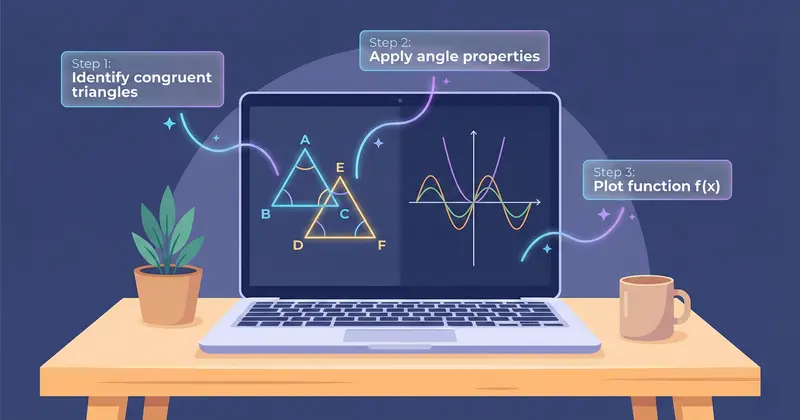
Imagine you're working through a geometry worksheet. You've got a diagram with intersecting lines, labeled angles, and a question asking you to prove two triangles are congruent. You could try typing all of that information into a text-based AI chatbot — describing every angle, every line segment, every given relationship. But by the time you've translated the visual problem into text, you've spent ten minutes just setting up the question.
The same challenge appears across math disciplines:
- Geometry: Diagrams with labeled points, angle bisectors, parallel lines, and auxiliary constructions
- Graphing and functions: Interpreting or sketching parabolas, trigonometric waves, piecewise functions, and transformations
- Coordinate geometry: Distance, midpoint, and slope problems that reference plotted points
- Statistics: Reading histograms, box plots, scatter plots, and regression lines
- Calculus: Understanding areas under curves, limits from graphs, and visual interpretations of derivatives
These problems are designed to be visual. Trying to solve them without understanding the diagram is like trying to navigate a city without a map.
How an AI Screen Assistant Changes the Game
An AI screen assistant like ScreenHelp works differently from traditional math tools. Instead of requiring you to type or photograph a problem, it captures what's already on your screen — whether that's a geometry diagram in your online textbook, a graphing exercise in your learning platform, or a practice exam question.
Here's the workflow:
- Share your screen (or just the relevant tab/window)
- Trigger the AI when you hit a problem you need help with
- Get a detailed explanation streamed back in real time
Because the AI has vision capabilities, it can interpret the actual diagram — the shapes, the labels, the graph's behavior — rather than relying on your text description of it. This is a massive advantage for visual math.
Geometry: Reading Diagrams Like a Tutor Would
A good geometry tutor doesn't just recite theorems. They look at the diagram, identify relationships, and guide you through the reasoning. An AI with screen vision capabilities does something remarkably similar.
For example, when faced with a geometry proof:
- It can identify which angles appear to be congruent or supplementary
- It recognizes parallel line markers, right angle symbols, and congruence tick marks
- It references the specific labeled points in its explanation
- It structures the proof logically, citing the relevant postulates or theorems
This means you're not just getting an answer — you're getting the kind of guided reasoning that helps you understand why the proof works.
Graphing: Making Sense of Curves and Transformations
Graphing problems trip students up because they require fluency in two directions: reading information from a graph, and predicting what a graph should look like given an equation.
Common graphing challenges where visual AI assistance shines:
- Identifying transformations: "How does the graph of f(x) = (x - 3)² + 2 relate to f(x) = x²?" When the AI can see both graphs on your screen, it can point out the exact horizontal shift, vertical shift, and any reflections or stretches.
- Analyzing behavior: Finding intercepts, asymptotes, intervals of increase/decrease, and concavity directly from a plotted graph.
- Piecewise functions: These are notoriously confusing. The AI can examine each piece of the graph and help you write or verify the corresponding function definition.
- Trigonometric graphs: Identifying amplitude, period, phase shift, and vertical shift from a sine or cosine curve.
Calculus: Bridging the Visual and the Analytical
Calculus is where visual intuition and rigorous computation meet. Many students can compute a derivative mechanically but struggle to explain what it means on a graph. An AI screen assistant can help bridge that gap:
- Looking at a graph of f(x) and explaining where f'(x) is positive, negative, or zero
- Interpreting shaded regions as definite integrals
- Explaining the relationship between a function, its first derivative, and its second derivative using the actual curves displayed on screen
Tips for Studying Visual Math More Effectively
Whether you're using AI tools or not, these strategies can strengthen your visual math skills:
1. Always Draw the Diagram (Even When One Is Given)
Redrawing a diagram by hand — even roughly — forces your brain to process the spatial relationships. Mark known lengths, angles, and relationships as you go. This active engagement helps you spot solution paths you'd miss by just staring at the original.
2. Color-Code Your Work
Use different colors for different elements: one color for given information, another for what you need to find, and a third for auxiliary lines or constructions. This reduces cognitive overload, especially in complex geometry problems.
3. Practice Graph Reading Independently
Before jumping to equations, spend time just reading graphs. Ask yourself:
- Where are the zeros?
- Where is the function increasing or decreasing?
- Are there any asymptotes?
- What's the end behavior?
Building this visual vocabulary pays dividends across algebra, precalculus, calculus, and statistics.
4. Use the AI as a Tutor, Not a Calculator
When you use an AI screen assistant, resist the urge to just grab the final answer. Instead:
- Try the problem first
- Use the AI to check your reasoning
- If you got it wrong, read the full explanation to understand where your thinking diverged
- Redo similar problems to reinforce the concept
This approach turns AI assistance into genuine learning.
5. Set Up Custom Prompts for Your Study Style
ScreenHelp lets you create custom predefined prompts that you can trigger with a single action. For math studying, consider creating prompts like:
- "Explain this geometry diagram step by step, identifying all relevant theorems."
- "Describe the transformations applied to the parent function shown in this graph."
- "Walk me through how to find the derivative from this graph visually."
This saves time and ensures the AI gives you the type of explanation that's most useful for your current study session.
When Visual AI Help Makes the Biggest Difference
Not every math problem requires visual interpretation. Simple arithmetic or algebraic manipulation is easily handled by text-based tools. But visual AI really shines in scenarios like:
| Scenario | Why Visual AI Helps |
|---|---|
| Online practice exams with diagrams | Interprets the diagram directly from your screen — no retyping needed |
| Graphing calculator output you don't understand | Explains the curves, intercepts, and behavior visible on screen |
| Geometry proofs in PDF textbooks | Reads the figure and labels without you having to describe them |
| Statistics charts and data visualizations | Identifies chart type, reads values, and explains trends |
| Certification prep with figure-heavy questions | Quickly breaks down complex visual problems during timed practice |
The common thread: whenever the visual element is central to understanding the problem, an AI that can actually see your screen removes the biggest bottleneck.
Mobile-Friendly Study Sessions
One practical tip: ScreenHelp lets you scan a QR code so that AI responses stream directly to your mobile browser. This is surprisingly useful for math study. You can have your laptop showing the problem or textbook while reading the step-by-step explanation on your phone beside it — no need to switch tabs or lose sight of the diagram you're studying.
The Bigger Picture: Building Mathematical Intuition
The real goal of studying math isn't to answer individual questions correctly — it's to build intuition. When you understand why the area under a curve represents an integral, or why the angle bisector theorem works, you can tackle novel problems with confidence.
Visual AI tools are powerful because they explain math the way it's meant to be understood: by looking at the picture and reasoning from what you see. Used thoughtfully, they don't replace mathematical thinking — they accelerate it.
Whether you're preparing for a geometry final, working through graphing exercises, or studying for a calculus certification, having an AI that can see exactly what you see on screen is the closest thing to having a tutor looking over your shoulder — available anytime you need it.
Start Using AI Screen Assistance Today
Join thousands of users who are already working smarter with ScreenHelp.
Related Articles
Why AI Screen Analysis is Better Than a Standard Calculator for Math
Calculators crunch numbers, but AI screen assistants understand your math problems visually — explaining steps, interpreting context, and teaching concepts.
Read article
Word Problems Made Easy: Using AI to Break Down Text Blocks
Struggling with math word problems? Learn proven strategies to decode complex text blocks, plus how AI screen assistants can guide you through each step.
Read article
Analyze Poetry and Literature Themes Visually with AI Screen Assistance
Struggling with poetry analysis or literature themes? Learn how visual approaches and AI screen assistants can deepen your understanding of complex literary texts.
Read article